
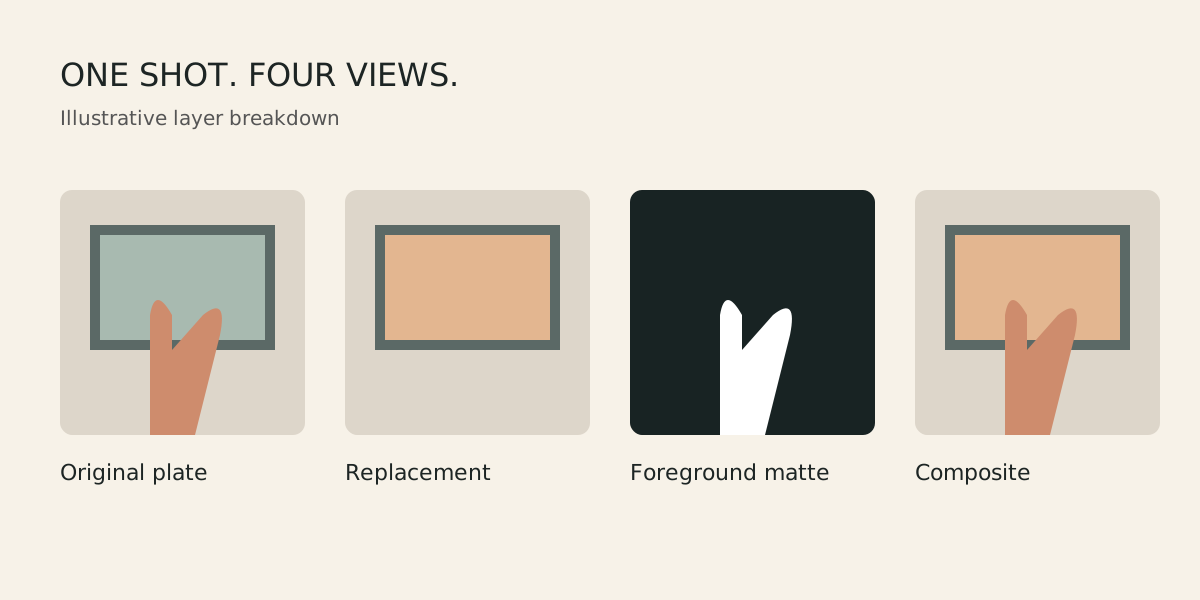
A finished visual-effects shot can look simple: a poster changes on a wall, a screen shows a different image, or an unwanted object disappears. The work becomes easier to understand when you separate the original footage from each change. That explanation is a shot breakdown.
This guide proposes a practice exercise: replace the image inside a picture frame while a hand passes in front of it. It is an illustrative assignment, not a student project or a claim about completed client work. Film your own material with permission and use artwork you own or are licensed to use.
Decide what the shot must prove
Keep the first exercise controlled. Choose a frame with visible corners, steady lighting and a brief, manageable movement. Write down the intended result: the replacement should stay attached to the frame, the hand should remain in front and the inserted picture should fit the surrounding light and texture.
Keep the untouched camera file. Note its frame rate and resolution, and use matching composition settings. If you change those settings later, explain why. A breakdown should help someone understand the work, rather than hide the original shot behind effects.
Understand the pieces
| Piece | Purpose | What to inspect |
|---|---|---|
| Plate | The original filmed background | Focus, motion and lighting changes |
| Track | Movement used to place the new picture | Drift against the frame edges |
| Mask or matte | Controls which areas are visible | Edges and changes between frames |
| Composite | The combined image | Perspective, colour, softness and motion |
| Breakdown | Shows the work and its limits | Whether your contribution is clear |
Track the surface before adding polish
In this exercise, the replacement belongs to the flat surface inside the frame. Match its perspective as the camera or frame moves. Adobe's motion-tracking guidance explains how corner pinning can position and distort an image to follow a four-sided area.
Inspect the track through the whole shot. A replacement that fits the first frame may drift later because a corner becomes hidden or the picture loses contrast. Stop at the first visible error and correct the tracking rather than adding blur to disguise it. Temporarily use a simple grid as the replacement so movement is easy to judge.
If your first attempt is too difficult, return to a locked camera and a stationary frame. Then add movement once the layering makes sense. Reducing the scope is a useful learning decision; it does not make the work dishonest.
Put the foreground back in front
When the hand crosses the frame, the new picture must not cover it. One approach is to duplicate the original plate above the replacement, then isolate the hand on that upper layer. The resulting matte determines where that foreground layer is visible.
A mask is a drawn boundary; rotoscoping involves maintaining an object's boundary over time. Adobe's Roto Brush and Refine Matte documentation describes tools for separating foreground and background. Tool assistance still needs inspection, particularly when motion blur, fine edges or occlusion change the boundary.
View the matte on its own and then in the composite. Look for holes, vibrating edges and a bright or dark fringe. Check the moment the hand enters and leaves the picture area. A still image can hide errors that become obvious in playback.
Make the replacement belong to the plate
Start with geometry, then judge appearance. Compare the replacement's brightness and colour with nearby surfaces. A perfectly sharp digital image may look pasted onto a softly focused camera shot. A clean image may also stand out against visible camera noise.
Work in small adjustments and compare before and after. Do not apply every available effect. Ask what mismatch each adjustment fixes. If the plate contains glass reflections, preserve or reconstruct them only within the scope you can explain. A flat replacement behind glass requires different attention from a printed poster.
Review the result at normal playback speed as well as frame by frame. Normal speed reveals flicker and distracting changes. Detailed inspection helps locate the cause. Both checks matter before exporting a final version.
Build a breakdown that shows your contribution
- Show the original plate long enough to understand the starting point.
- Show the tracked replacement without decorative transitions hiding its edges.
- Show the foreground matte or an overlay that explains the isolation.
- Show the final composite, followed by a direct comparison.
- Add a short written note about what you made, what assets came from elsewhere and what remains imperfect.
Use plain labels such as original plate, replacement, foreground matte and final composite. If a colleague filmed the plate or supplied an asset, credit the contribution. Do not label a practice piece as a paid production. The explanation should be specific enough for a reviewer to ask a useful question.
Use feedback to choose the next revision
Ask a reviewer to name the first distracting moment and describe what looks wrong. “The insert moves sideways when the hand enters” gives you a starting point. “Make it cinematic” does not. Keep the previous export and a short revision note so you can compare the actual change.
Do not use a synthetic or generated image as proof of a student's work. Generated assets can be used for a practice exercise where their origin and use are explained, but the shot breakdown must still distinguish the assets from your tracking, masking and compositing contribution.
Common questions
Do I need a complex scene for my first breakdown?
No. A controlled replacement that you can explain and refine is useful practice. Add moving cameras, difficult reflections and more foreground objects gradually.
Can an automatic mask finish the shot for me?
It can produce a starting result. You still need to inspect the boundary over time and check how it looks against the replacement.
Should I include a shot with visible imperfections?
For feedback, yes: identify the limitation and ask a focused question. For a portfolio, select work that represents your current standard and explain your actual role honestly.
Explore the Video Editing and VFX programme and VFX Pro course, then ask about a free demo class. Bring the original plate and your breakdown to discuss which skills need practice.