
Learn to make a design communicate
A graphic design course should help you decide what the viewer needs to notice, then use type, images, colour and spacing to make that clear. Learning the software matters, but so does explaining why a layout works.
Pepper Animation's graphic design certificate brings together design foundations, Canva, Photoshop and Illustrator, with creative AI tools in the published curriculum. The course currently lists a three-month duration. Ask about the next batch, teaching hours, software access and feedback arrangements at your free demo.
Who it suits and how to prepare
This course is an option for learners exploring posters, social graphics, image editing and brand artwork. It can also help someone who already uses templates but wants to understand composition and create work with more control. No minimum qualification is listed for admission; ask the team to discuss your starting point.
You do not need to arrive with a professional portfolio. Bring a design you like and explain what catches your attention. Basic computer confidence helps: creating folders, saving different versions and finding the right file are part of the work. Drawing practice can help you explore ideas, but this course is not limited to people who already draw well.
Software and the job each tool does
- Canva: work with templates, text, photographs and layouts, then adapt a design rather than only changing its headline.
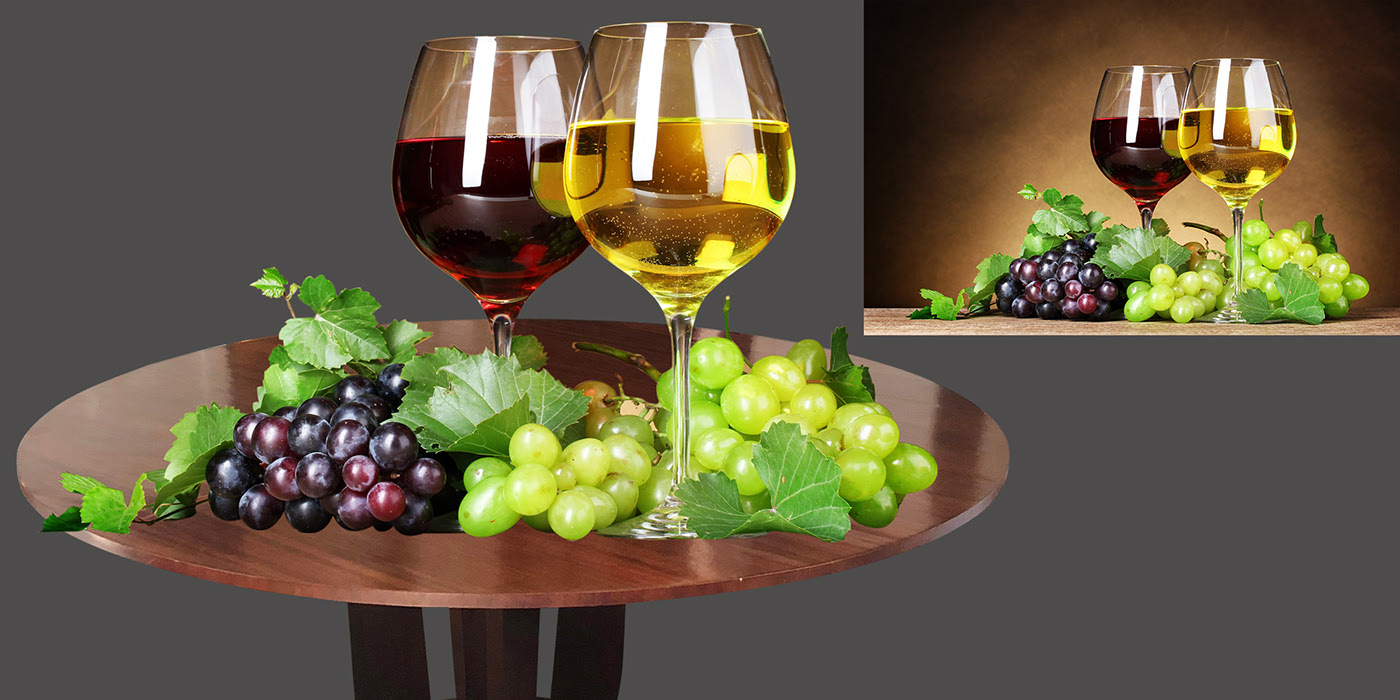
- Photoshop: edit photographs and build image-based compositions using selections, layers and masks.
- Illustrator: create and refine vector artwork, such as icons and illustrations that can be resized.
The difference between a pixel image and vector artwork matters when preparing files. An enlarged low-resolution photograph can lose detail; changing its file extension does not turn it into a clean vector drawing. Choose the tool and export format for the intended use.
Creative AI is part of the curriculum below. Treat generated suggestions as material to check and refine: look for awkward text, inconsistent details and a poor fit with the brief. Confirm the tools used in your batch and which subscriptions or credits you would need before paying for software.
Course modules
Start with visual foundations, then connect individual software techniques to a complete design. The following modules reflect the published course outline; the trainer confirms the current versions and teaching order.
Getting Started
- Fundamentals of Computer & internet
- Introduction to Graphic Designing
- Vector and Raster Graphics
- Color & graphics contents
- Image Formats
- Basic art & sketching
- Online Tools and Techniques
Canva
- Canva Introduction.
- Using and customizing templates.
- Using search and personalizing the editor.
- Uploading and using photos.
- Using and editing elements.
- Finding fonts and using text.
- Uploading and editing video and audio.
- Sharing and collaborating on designs.
- Saving and organizing documents.
- What’s next?
Adobe Photoshop
- Interface, Tools, Keyboard Shortcuts and Document Settings
- Image Retouching and Color Grading
- Image Selections and Masking
- Image Manipulation and Special Effects
- 3D MockUp Designing
- Filters, Luts and Actions
- GIF and Animations
- UI and Website Layout Designing
- Social Media Creatives Designing
- Printing/Publishing Techniques
Adobe Illustrator
- Interface, Tools, Keyboard Shortcuts and Document Settings
- Professional Illustration
- Creating 3D Text and Objects
- Perspective Illustration
- Vector Portraits and Advanced Illustration
- Isometric Illustrations
- Typography Techniques
- Printing/Publishing Techniques
AI Tools for Graphic Design
- How image generators work, and where AI helps a designer (ideas, variations, clean-up) and where it does not (final typography, brand rules)
- Writing prompts: subject, style, lighting, composition and what to leave out
- Generating concepts, textures and illustrations with Adobe Firefly and Midjourney
- Photoshop Generative Fill and Expand: extend backgrounds, remove objects, add elements
- One-click background removal in Photoshop and Canva
- Upscaling low-resolution images for print with the free Upscayl app
- Colour palettes and font pairing with free tools such as Coolors and Fontjoy
- Canva Magic Studio for quick social media variations and resizing
- Writing headlines and captions with ChatGPT, and checking them before use
- Copyright, licences and client disclosure for AI-generated work
- Project: a brand campaign (logo concepts, three posters and a social media set) using AI for ideas and production
Practical work: from a brief to a finished file
The published AI module includes a brand-campaign project. The following fictional brief shows how to discuss that kind of work with a trainer; it is not a real client commission or a promise of a particular assessed assignment.
Imagine a neighbourhood reading club needs an event poster and a matching social graphic. Start with the event name, the intended audience and the information they must be able to find. Use invented contact details and your own or appropriately licensed images.
- Sketch the hierarchy: decide what is read first, second and last before choosing effects.
- Build the artwork: edit an image or draw a simple graphic, then combine it with readable type.
- Adapt the layout: change the composition for the social format rather than squeezing the poster into a new shape.
- Review and export: check spelling, alignment and readability at the intended size. Confirm the required file format before exporting.
Keep the brief, a first attempt, the revised version and your editable files. A portfolio piece is easier to discuss when you can explain the decisions and corrections behind it. If you used a template, stock asset or generated element, record that contribution honestly; do not present someone else's artwork as your own.
Questions to bring to your free demo
- How much practice should I plan between classes, and how is feedback given?
- Which current tools and paid features are included in classroom access?
- What equipment and software would I need for practice outside class?
- Which files or projects demonstrate course completion?
Graphic design, motion graphics and video editing are related but different routes. If you mainly want to animate titles or edit footage, compare the After Effects and video editing pages before choosing. Placement assistance is support with preparation and opportunities, not a job guarantee.
A useful next step
Explore Adobe's introductions to Photoshop and Illustrator, or its explanation of vector files. These are product references, not endorsements of the course.
Book a free demo with an example of the work you want to make. Ask the team to connect that goal with the actual course, current fee and batch schedule.